
Blog2Vid Features – AI Blog-to-Video Tools, Voiceovers, Visuals & More
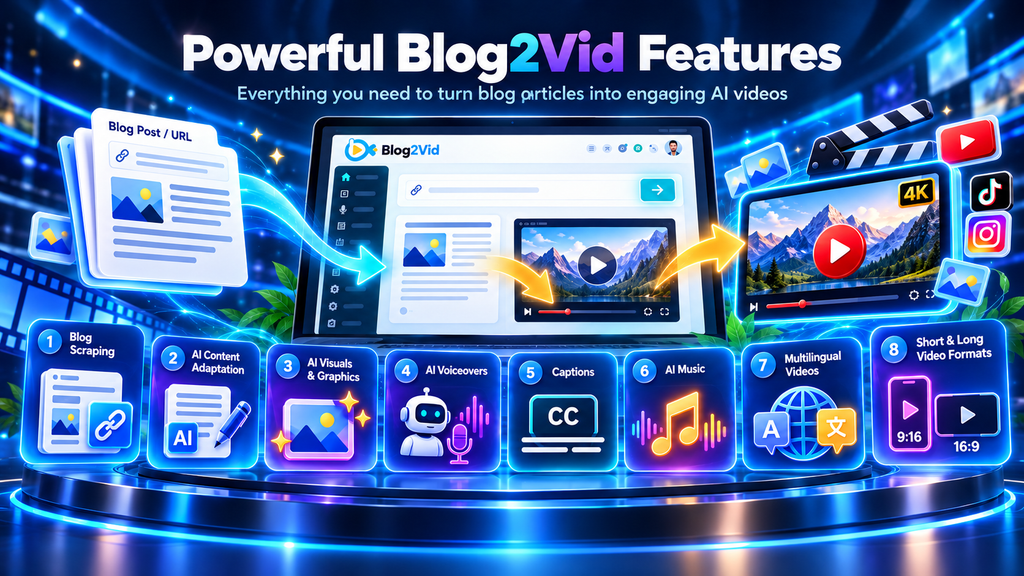
Blog2Vid is built around one simple idea: take existing written content and turn it into video without forcing you to rebuild everything from scratch.
Instead of writing a script manually, searching for stock footage, recording narration, adding music, creating captions, and editing scenes one by one, Blog2Vid brings those steps into a more automated workflow.
That is what makes the software interesting for bloggers, marketers, agencies, publishers, and business owners.
Below is a closer look at the main Blog2Vid features and how they fit together.
Blog Scraping
The first step is content extraction.
Blog2Vid can pull article text and available images directly from a URL.
That means you do not have to manually copy paragraphs, download every image, and rebuild the content inside another tool.
For someone with a large archive of blog posts, this alone can save a noticeable amount of time.
You simply start with the article that already exists.
From there, Blog2Vid uses that content as the foundation for the video.
AI Content Adaptation
A blog article and a video script are not exactly the same thing.
Written content often contains longer paragraphs, formal explanations, internal links, side notes, and structures that do not always sound natural when read aloud.
Blog2Vid can adapt the article for video.
In simple terms, it helps turn written information into something more suitable for spoken narration and visual presentation.
You can also use the source content more directly when that makes sense.
The flexibility is useful because some articles already have a natural conversational flow, while others need more adjustment before becoming a video.
AI Visuals and Graphics
Video needs more than narration.
Blog2Vid can automatically plan and generate visuals to match different parts of the content.
This includes AI-created visuals and graphics alongside images pulled from the original article.
That matters because one of the biggest time-consuming parts of video production is finding something relevant to show on screen.
Without automation, you might spend more time searching for visuals than writing the script itself.
Blog2Vid attempts to remove much of that manual work.
AI Voiceovers
Blog2Vid includes AI-generated narration.
The Elite version comes with 5 AI voices, while Pro expands the available voice capabilities and adds voice cloning.
You can also create content in different languages and accents.
This can be particularly useful for publishers targeting more than one region.
For example, the same article idea could potentially become separate videos for different audiences without recording every version manually.
Voiceovers also remove another common barrier.
You do not need a microphone setup, sound-treated room, or confidence speaking on camera.
The software handles the narration for you.
Voice Cloning With Blog2Vid Pro
Blog2Vid Pro adds voice cloning capabilities.
This feature is designed for users who want a more personalized voice experience rather than relying entirely on standard AI voices.
It may be especially useful for marketers, agencies, and businesses that want more consistency across their video content.
Pro is also better suited to users who plan to scale production or create content commercially.
AI Music
Blog2Vid can add background music to video projects.
The Pro version includes unlimited AI music tracks.
Background music sounds like a small detail, but it can make a big difference to the overall feel of a video.
It helps fill silent gaps, adds energy, and can make automated content feel more polished.
Normally, finding suitable music involves browsing libraries, downloading tracks, importing them, and adjusting volume levels.
Blog2Vid is designed to simplify that part of the process.
Automated Video Editing
One of the core Blog2Vid features is automated editing.
The platform combines:
- article content
- visuals
- graphics
- AI narration
- background music
- captions
into a finished video.
This is important because generating separate pieces of content is only half the job.
Someone still has to assemble them.
Blog2Vid handles much of that assembly automatically.
That makes the software more approachable for people who have never used traditional editing tools.
To be honest, that is probably one of its biggest advantages.
You do not have to learn timelines, layers, transitions, audio tracks, and editing shortcuts just to turn an article into a usable video.
Short-Form and Long-Form Videos
Blog2Vid supports both shorter and longer video formats.
That makes it suitable for different platforms and content strategies.
Short-form content can be useful for platforms such as:
- TikTok
- short social clips
Longer videos may be more suitable for:
- YouTube
- tutorials
- educational content
- explainers
- detailed product or topic videos
Blog2Vid Elite supports videos up to 25 minutes long.
Blog2Vid Pro removes that restriction and supports unlimited-length videos.
That difference matters if you plan to create extended tutorials or long-form educational content.
Multi-Platform Video Creation
Blog2Vid is designed to help users repurpose content across several platforms rather than creating only one type of video.
The idea is simple.
One article does not have to stay trapped on one webpage.
It can become video content for YouTube, TikTok, Instagram, Facebook, and other channels.
This does not mean the exact same format will always perform equally well everywhere.
A long YouTube explainer and a short vertical social video serve different audiences.
But Blog2Vid gives you a faster starting point for creating both.
Multilingual Video Creation
Blog2Vid supports multiple languages.
This can help publishers expand content into different markets without creating every project manually from the beginning.
The combination of multilingual content adaptation and AI voiceovers makes it easier to reuse the same underlying idea across different audiences.
For businesses and marketers targeting international traffic, that can be a valuable feature.
Team Access and Commercial License
Blog2Vid Pro includes team access and commercial licensing.
That changes the use case significantly.
The Elite version is designed around self-business use.
Pro is more appropriate if you plan to create content for clients, operate an agency, or have multiple people working on video production.
For example, an SEO agency could take client blog posts and convert them into videos as part of a monthly content package.
That creates an additional service opportunity without requiring traditional video production.
See the complete Blog2Vid OTO structure →
Blog2Vid Elite vs Pro Features
| Feature | Elite | Pro |
|---|---|---|
| Welcome Credits | 20,000 | 50,000 |
| Videos Per Day | 5 | 15 |
| Video Length | Up to 25 Minutes | Unlimited |
| AI Voices | 5 | Expanded |
| Voice Cloning | No | Yes |
| AI Music | Limited | Unlimited |
| Media Library | Limited | Expanded |
| Team Access | No | Yes |
| Commercial License | No | Yes |
| Free Upgrades | 1 Year | 2 Years |
The right plan depends on how you plan to use Blog2Vid.
For a solo website owner, Elite may already provide enough.
For agencies, marketers, and businesses creating more videos or working with clients, Pro adds the features that matter most.
Turn More of Your Existing Content Into Video
The strongest Blog2Vid feature is not any single AI tool.
It is the way the platform combines multiple production steps into one workflow.
You start with content you already have.
Blog2Vid handles much of the extraction, adaptation, visuals, voice, music, captions, and editing.
That means less time rebuilding content and more time deciding what to publish next.
For anyone sitting on a library of useful blog posts, that can make video creation far more practical.